TagSonic
Register here
Ai fost recomandat de
Independent information page

Put a Gold Strategy on Autopilot — a Track Record of 24 Straight Winning Months

Hands-off mirroring of a specialist XAUUSD desk — on an amplified account that historically targets around 19% net monthly on your own capital.

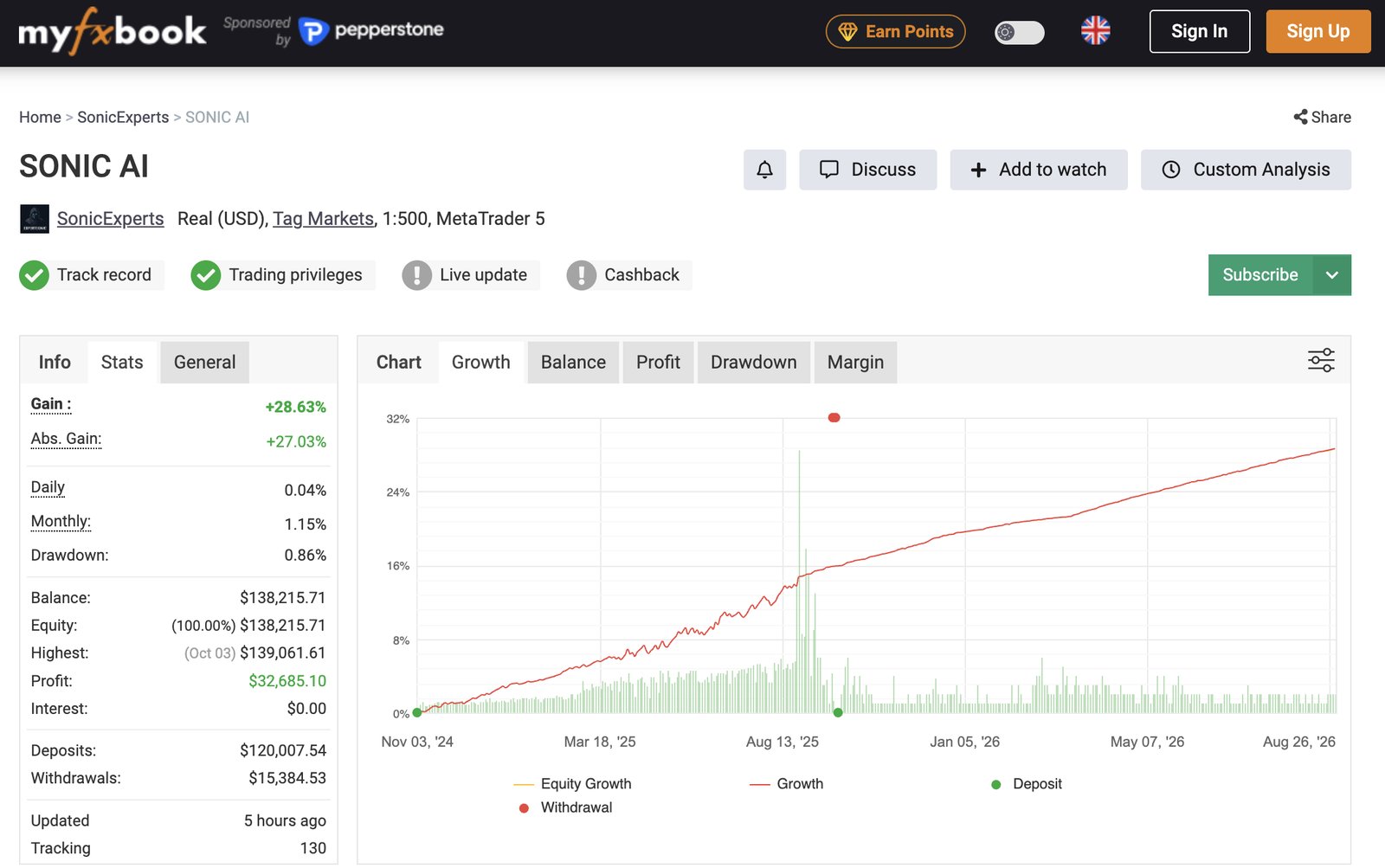
This is past performance, independently audited on MyFXBook — not a holding period or a guarantee of future results.

XAUUSD specialist deskReplication via COPYXOperated by TAG MarketsFSC Mauritius licensed800k+ followers
Urmărește mai întâi

Sonic AI în trei minute

Ce primești ca investitor: istoricul, contul 24X, costurile și cum începi.

Verified Performance

The record, in four numbers

Every metric below is drawn from the full twenty-four-month audited history.

~19%
Est. net monthly
On your capital · 24X · historical estimate
0.86%
Deepest drawdown
Across the full record
83%
Trades won
Across the full record
Până la 24X
Amplified account
12X & 24X amplified accounts
Fă-ți propria proiecție →
/ 01

One market, done well

A dedicated desk trades gold and nothing else. When the team opens a position, it replicates straight into follower accounts in the same instant.

/ 02

Proof, not promises

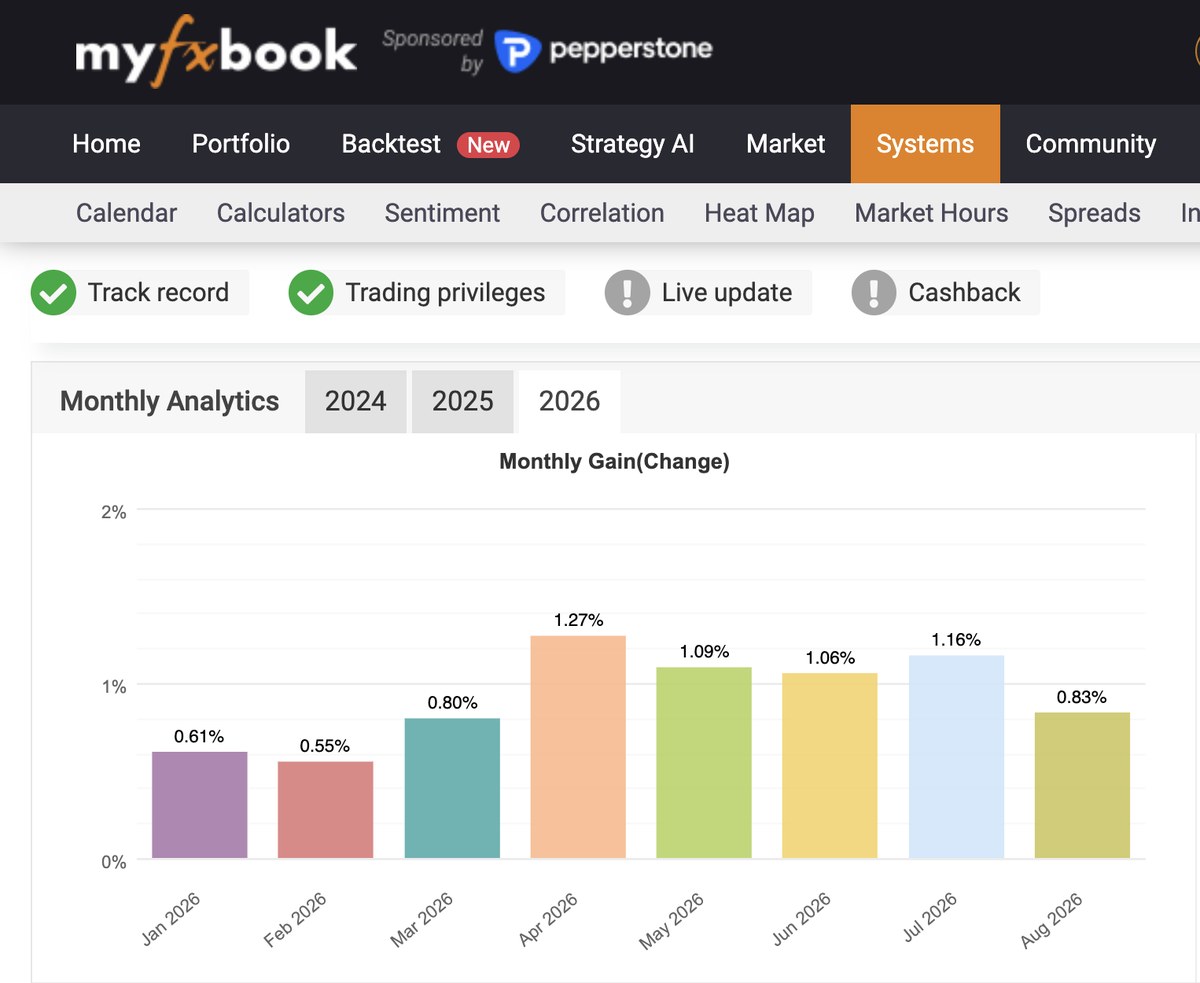
Twenty-four profitable months in a row, an 83% win rate, and a worst drawdown held under one percent — all checked independently through MyFXBook.

/ 03

Built on COPYX

Copying runs on COPYX, the platform from TAG Markets, which holds a licence from the Financial Services Commission of Mauritius.

How your money grows

Why a "1% a month" strategy targets ~19% on your capital

The strategy stays deliberately conservative at the fund level. Amplified accounts are what turn small, low-risk gold trades into a meaningful monthly return on the money you put in.

~1.13%
Fund-level monthly target
Small, consistent gains from tightly risk-managed gold trades.
×
24X
Amplified capital
$10,000 trades like $240,000 through 75 liquidity providers.
×
70%
Your share of the profit
You keep 70%. The other 30% is the performance fee.
=
~19%
Est. net monthly on your capital
Historical estimate after the performance fee — not a guarantee of future results.
De ce fac asta furnizorii de lichiditate?

Furnizorii de lichiditate sunt marile firme financiare care asigură capacitatea de tranzacționare din spatele tranzacțiilor unui broker. TAG Markets spune că lucrează cu 75 dintre ei. Pe un cont 24X, ei adaugă capacitatea de tranzacționare care îi permite unui depozit de $10.000 să tranzacționeze ca $240.000. O fac din trei motive.

  1. Câștigă din volum. Fiecare tranzacție pe care Sonic o face pe un cont amplificat folosește lichiditatea lor, iar ei iau o parte din acest volum de tranzacționare. Mai multă capacitate de tranzacționare înseamnă mai mult volum, iar mai mult volum înseamnă venituri mai mari pentru ei.
  2. Riscul lor este plafonat. Ei oferă capacitate de tranzacționare, nu bani de cheltuit, și îi stabilesc o limită de drawdown: 5% la 24X, 10% la 12X. Limita îi protejează pe furnizori. Pierderile se scad din depozitul investitorului.
  3. Lichiditatea lor rămâne în cont suficient cât să le aducă bani. Depozitul rămâne în cont în primele 30 de zile, așa că lichiditatea lor produce câștig cel puțin atât. Profiturile pot fi retrase în orice zi.

Toți sunt plătiți din tranzacționare. Furnizorii câștigă din volum, brokerul câștigă din comisioane, traderii Sonic primesc 5% din profit, iar investitorul păstrează 70%. De aceea activarea contului 24X nu costă nimic în plus.

Real verified account
$400,000 deposit → ~13.4% average net monthly over 5.5 months

Amplified to a ~$9.6M trading portfolio, the account produced roughly $295,000 net profit across the period. The investor later added more capital — every balance and trade is visible in the COPYX Follower Hub.
Don't take our word for it — verify it
T.M. Financials LtdMetaTrader 5 broker

See a real account, since day one

A client account connected on the very first day Sonic AI launched on CopyX. Open MetaTrader 5, log in with the investor password below, and read the full history yourself.

Login
50503703
Investor password
Sonic20251!
Broker
T.M. Financials Ltd

A clean example of what compounding does over time.

The investor password is read-only. It can view the account and its full trade history — it cannot trade, deposit or withdraw.
Simple & transparent

No monthly fees. Start from $10.

Invest whatever amount suits you, from as little as $10. No subscription, no management fee — the only cost is a performance fee taken on profit.

70%
Kept by you

You keep 70%

The 30% performance fee is charged only on profit and deducted weekly. No profit means no fee — your interests and the team's are aligned.

$10
Minimum to start

Start from $10

Put in what you're comfortable with. No monthly charge, no subscription, and no management fee eating into your balance.

Zilnic
Withdraw or reinvest

Profits, your way

Withdraw or reinvest your profits any day — your choice. Your initial capital unlocks after a 30-day liquidity-provider period required by the broker.

Why it's safe

A licensed, regulated place for your capital

Before you deposit anything, here's what stands behind the strategy and your money.

⚖

Regulated broker

TAG Markets (TM Financials Ltd) is licensed by the FSC of Mauritius and the FSCA in South Africa — with over 1,000,000 clients and $1.2 trillion traded in October 2026.

🛡

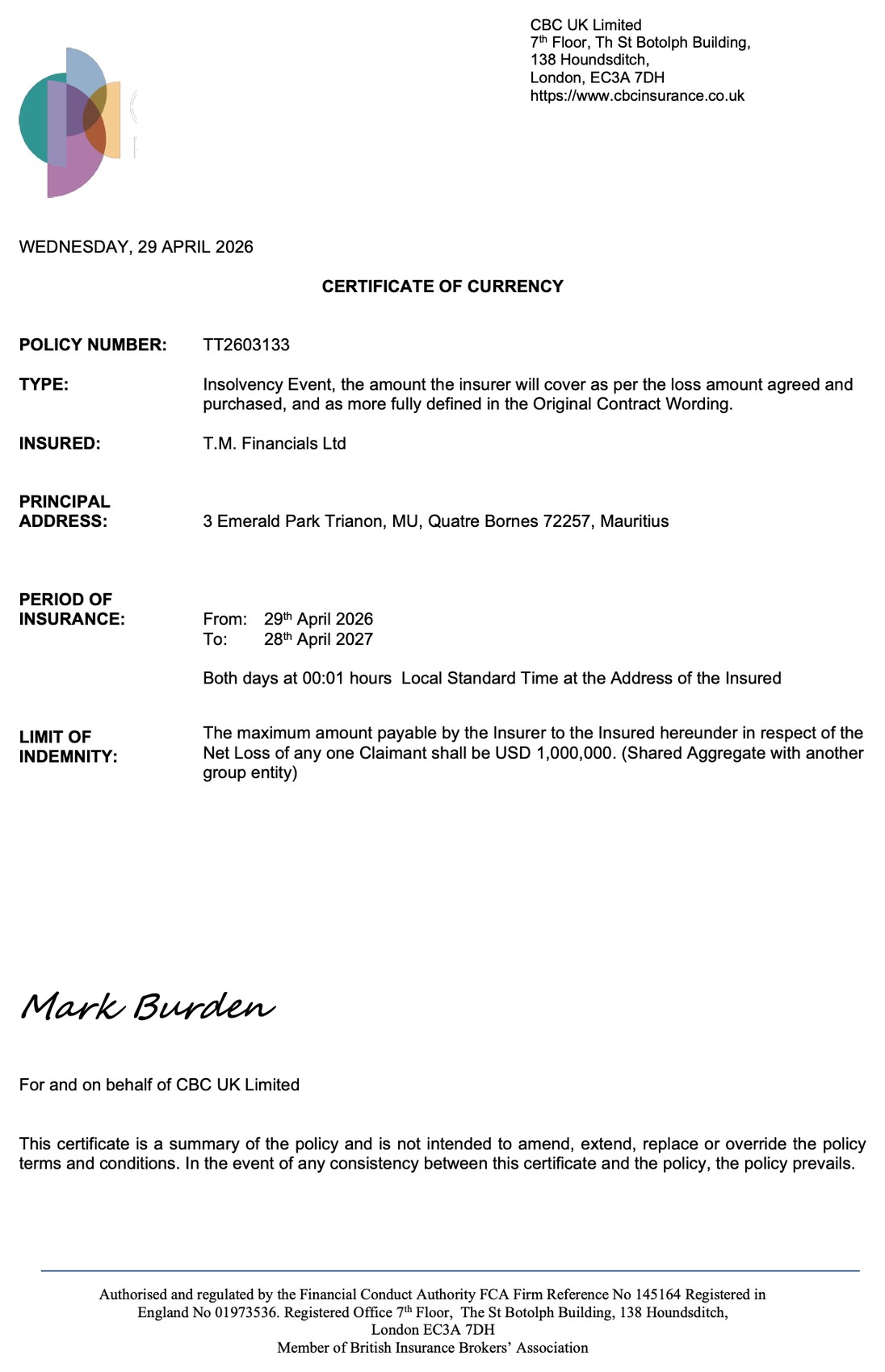
Insolvency insurance up to $1M

TAG holds an insurance policy that can pay out if client funds are lost through misconduct and the broker becomes insolvent. The limit is $1,000,000 per claimant, and every claim carries a $20,000 excess, so if you invest less than $20,000 there is no cover. View the policy →

◎

Independently verified

Every trade, the win rate and the drawdown are public on MyFXBook before you invest — nothing is self-reported.

✓

Risk math in your favour

Max 0.04% risk per trade means it would take ~100 losing trades in a row to hit the drawdown limit. Only two consecutive losses have ever been recorded.

Press

Nine stories. Twelve articles. Five weeks.

We don't ask you to take our figures on trust. Here is where else they were printed.

1M+
clients reported
1.200 mld. $
transactional volume
9
stories, Aug–Sep 2026

$1.2T is our own October 2026 figure. Other numbers as reported by Forbes and Tech Times, September 2026.

Gulf TimesAfaceri29.09.2026Ce face ca o companie financiară să merite încredere? Niklas Freihofer„O companie financiară de încredere are, așadar, nevoie de mai mult decât de un om de încredere în frunte.” — despre Niklas Freihofer, fondatorul TAG Markets↗ IBTimes UKColaborator · William Jones25.09.2026Produsele financiare trebuie să pornească de la client – Niklas Freihofer„Un produs financiar poate fi ușor de vândut și totuși prost conceput.” — despre Niklas Freihofer, fondatorul TAG Markets↗ IBTimesColaborator · Will Jones22.09.2026A cumpăra o participație într-o companie și a îmbunătăți compania sunt două abilități foarte diferite„De aceea Freihofer vede proprietatea ca pe ceva mai pretențios decât simpla deținere de acțiuni.” — despre Niklas Freihofer, fondatorul TAG Markets↗ Market RealistAnaliză financiară16.09.2026De ce Tag Markets este diferit de brokerii Forex tradiționali„Pe o piață care procesează $9,6 trilioane în fiecare zi, diferențierea nu poate fi susținută doar prin branding.”↗ Tech TimesCarl Williams03.09.2026Ce urmează pentru TAG Markets? În culisele strategiei globale de creștere a brokerului„Peste 1 milion de clienți și peste $820 de miliarde în volum tranzacționat.”↗ EntrepreneurIndia01.09.2026TAG Markets trece la produse construite în jurul nevoilor reale de tranzacționare„Prin CopyX, clienții pot analiza traderii și strategiile disponibile și pot decide dacă activitatea eligibilă trebuie replicată automat.”↗ Latin PostDavid Thompson28.08.2026Conturile 12X și 24X ale TAG Markets: o abordare diferită a tranzacționării„Ce-ar fi dacă structura contului în sine le-ar putea oferi traderilor mai multă flexibilitate în accesul la capitalul de tranzacționare?”↗

Coverage of TAG Markets, the partner broker. This page is operated by an independent CopyX partner and is not endorsed by any publication listed.

800,000+
People following Sonic AI
$1.2T
TAG Markets trading volume, October 2026
~19%
Est. net monthly on your capital
24X · historical estimate, not a guarantee
Getting Started

Live in three moves

Open a free account through your invitation link and you're routed straight into TAG Markets and Sonic AI. A full 14-step visual guide walks you through it.

1

Create your account

Sign up with TAG Markets through this page. The whole thing is online and takes roughly ten minutes.

2

Deposit and link

Add funds, then connect the account to Sonic AI inside COPYX — a handful of clicks and you're paired.

3

Let it run

From there the strategy trades for you. Each position is mirrored into your account on a proportional basis while you simply watch.

Open the full registration guide →
27-step illustrated walkthrough · in the Registration Guide tab
Sonic AI Registration Guide · v08/2026

From sign-up to live copy trading

A step-by-step walkthrough that takes you from creating your account to an active 24X copy-trading setup.

⏱ ~15 minutes One-time setup 14 core steps · 4 phases
What you'll need
⏱About 15 minutes — one-time setup
🪪A physical ID: ID card, passport or driving licence (for verification)

The short version

Four phases, about 15 minutes. Open the full guide to see every step with screenshots.

1
Phase 1

Create your CopyX account

  1. 1Open your invitation link
  2. 2Enter your details
  3. 3Confirm your email
  4. 4Log into copyxapp.com
  5. 5Complete your suitability survey
2
Phase 2

Sync your TAG Markets broker

  1. 6Sync from your profile
  2. 7Confirm your TAG Markets email
  3. 8You're automatically logged in
Register only through your invitation link — an account opened directly on CopyX or TAG Markets won't be linked to your setup.
3
Phase 3

Verify identity & fund your account

  1. 9Verify your identity
  2. 10Make your deposit
  3. 11Choose a payment method
  4. 12Send your crypto
Critical: the network you pick here must match the network you send from. A mismatch means funds are permanently lost and cannot be recovered.
4
Phase 4

Activate Sonic AI

  1. 13Open CopyX & connect to Sonic
  2. 14Set investment & activate 24X
Token: #DWHASH/GU-ID: 1000
Show the full step-by-step guide with screenshotsHide the full guide
1
Phase 1

Create your CopyX account

Steps 1–5 · Create your account, verify it, log in, and complete your survey
1

Open your invitation link

Use the invitation link you were given to open the sign-up page.
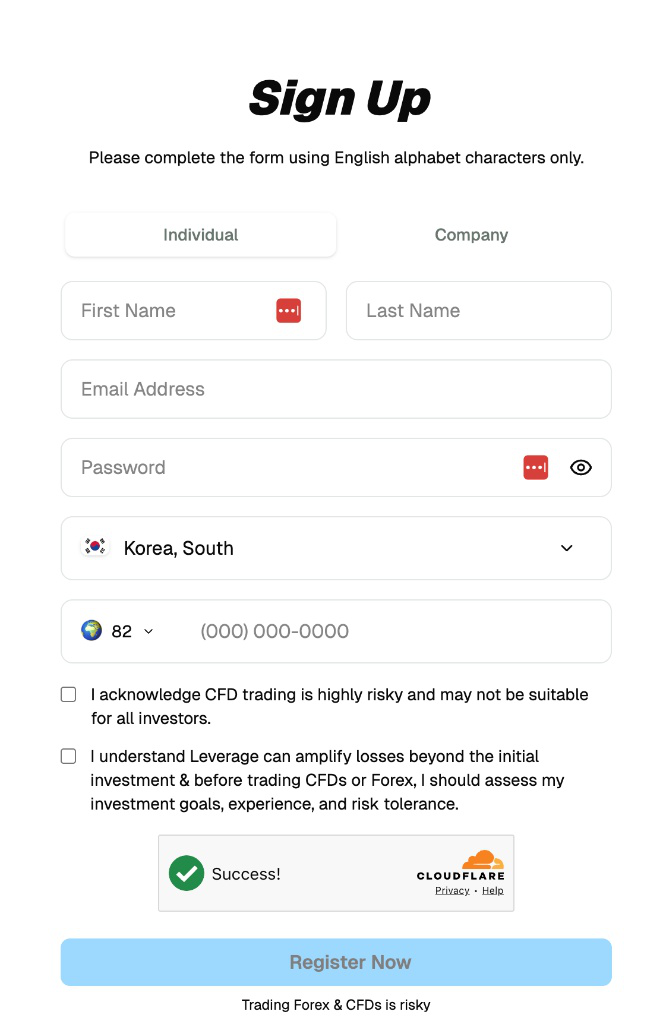
Deschide linkul tău de invitație
2

Enter your details

Fill in every field using the English alphabet only, then click "Register Now."
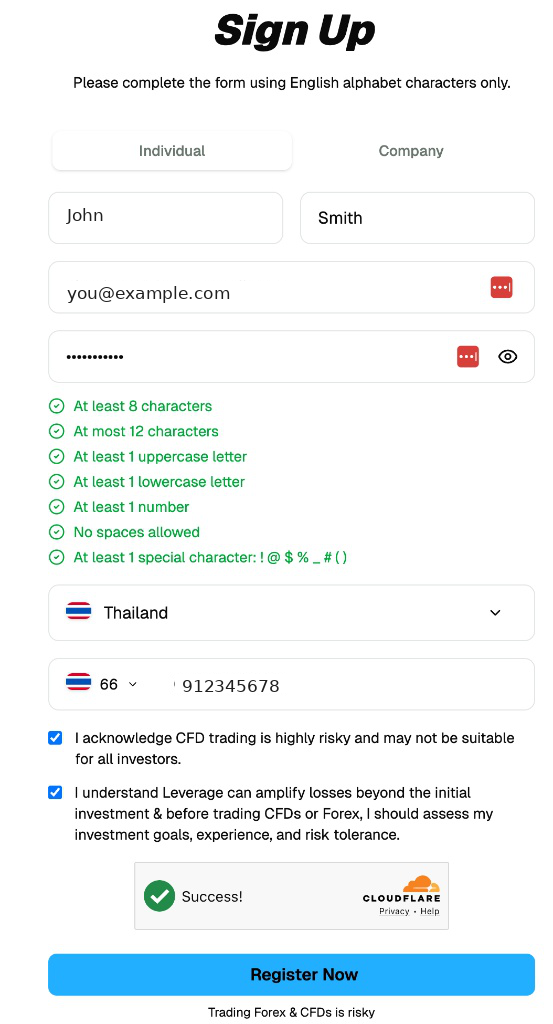
Formular de înregistrare
  • First and last name
  • Email address
  • A strong password
  • Country of residence
  • Phone number
  • Accept both risk acknowledgements
3

Confirm your email

Open the confirmation email from COPYX and click the verification link.
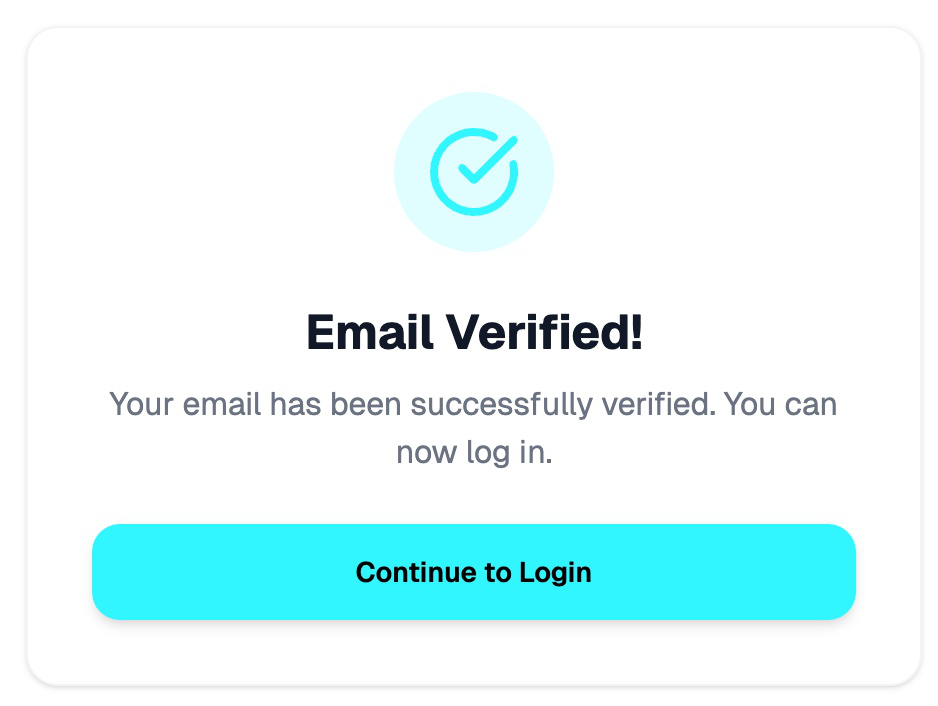
Verifică-ți e-mailul
No email after 2 minutes? Check your spam or promotions folder. Sender: COPYX <notifications@updates.copyxapp.io>
4

Log into copyxapp.com

Sign in with the email and password you just registered to reach your CopyX profile.
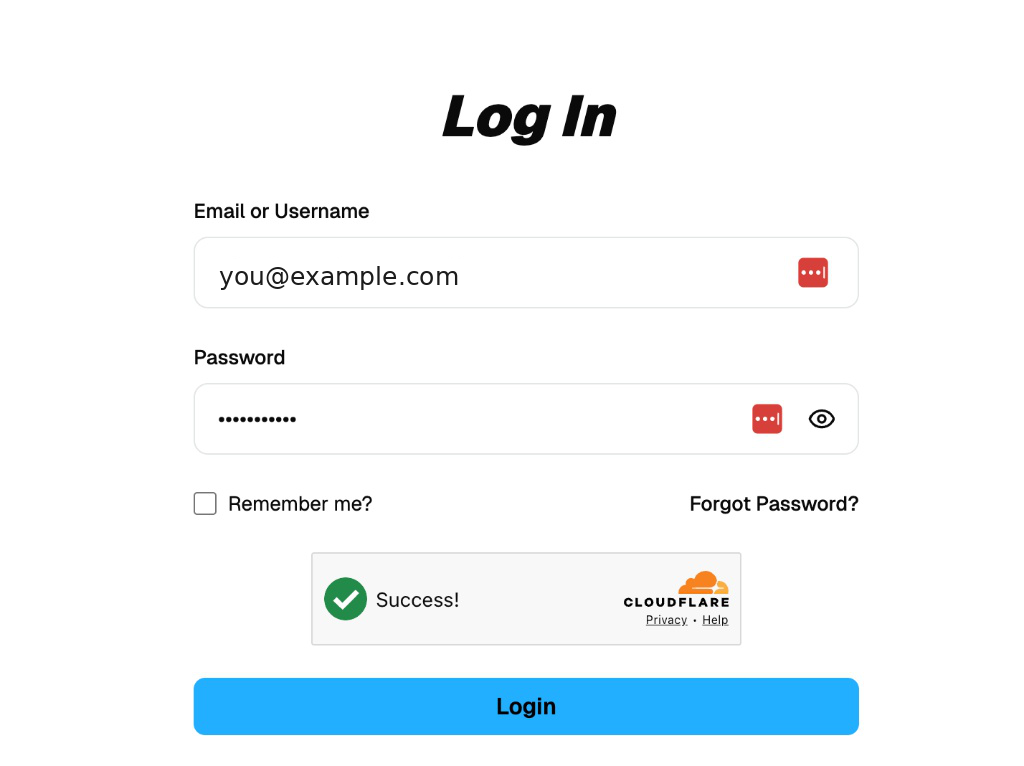
Conectează-te pe copyxapp.com
Save these login details — you'll use them every time you log in to check your account.
5

Complete your suitability survey

Answer the short questionnaire on risk tolerance and investing experience. Once it's submitted, you'll land on your profile.

2
Phase 2

Sync your TAG Markets broker

Steps 6–8 · Link your broker account from your CopyX profile
6

Sync from your profile

On your profile page, scroll down to the "CopyX Registration" card and click "Login to CopyX" — this synchronizes your account with TAG Markets automatically.

Cardul de înregistrare CopyX – butonul Login to CopyX
Register only through your invitation link — an account opened directly on CopyX or TAG Markets won't be linked to your setup.
7

Confirm your TAG Markets email

Open the email from TAG Markets and confirm your address — this email contains a new password for the TAG Markets Portal, generated automatically for you.
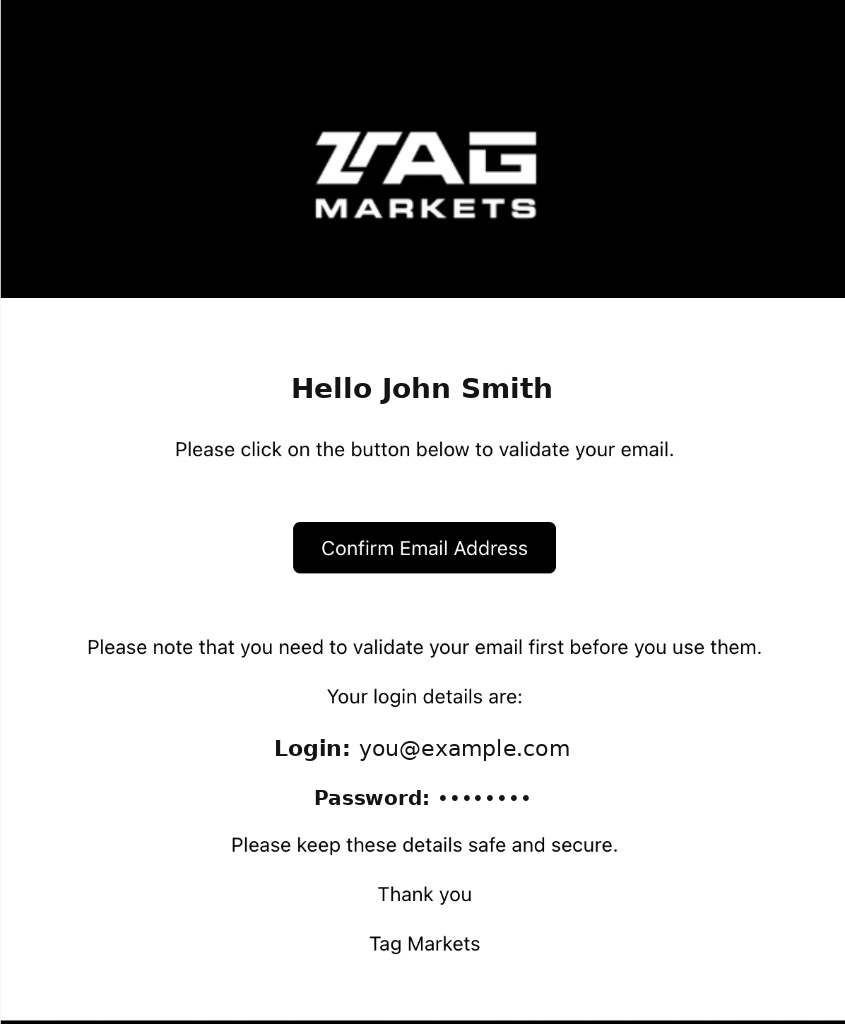
Confirmă-ți e-mailul
Easy to miss — check spam or promotions. This email carries your new TAG Markets password.
8

You're automatically logged in

Confirming the email logs you straight into the TAG Markets Portal (portal.tagmarkets.com) — no further action needed.

Recommended: change your TAG Markets Portal password to match the one you use on copyxapp.com — one password for both.
3
Phase 3

Verify identity & fund your account

Steps 9–12 · Complete KYC and make your first deposit
9

Verify your identity

In the red KYC banner at the top of your TAG Markets dashboard, click "upload documents," then upload any two accepted document types.
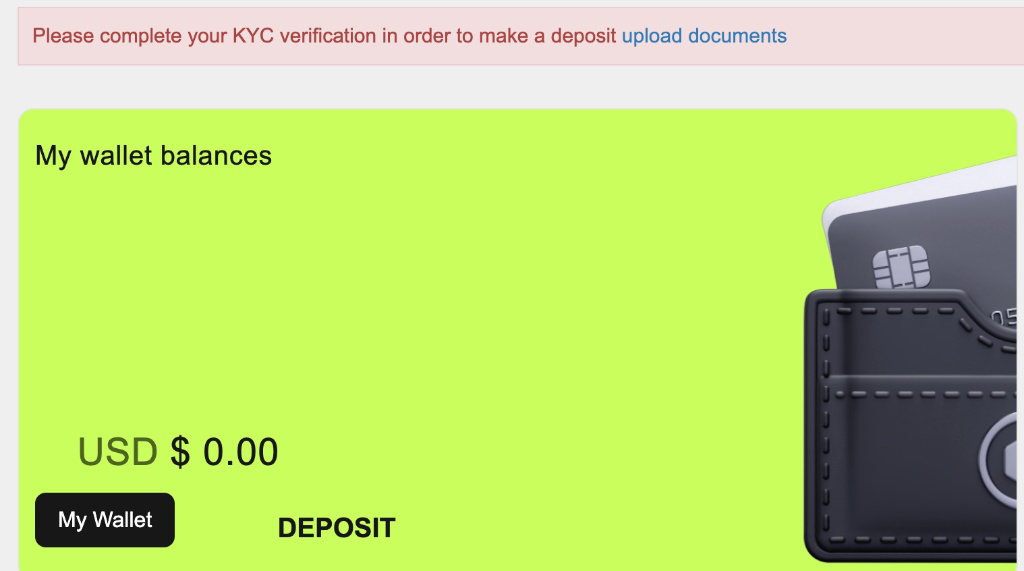
Verificarea identității
  • Passport
  • National ID (front + back)
  • Driver's licence
  • Residence permit
  • Selfie
Verification usually completes within a few minutes.
10

Make your deposit

Click Deposit on your wallet card, choose USD, pick a preset or enter a custom amount under "Other amount," then click Next.
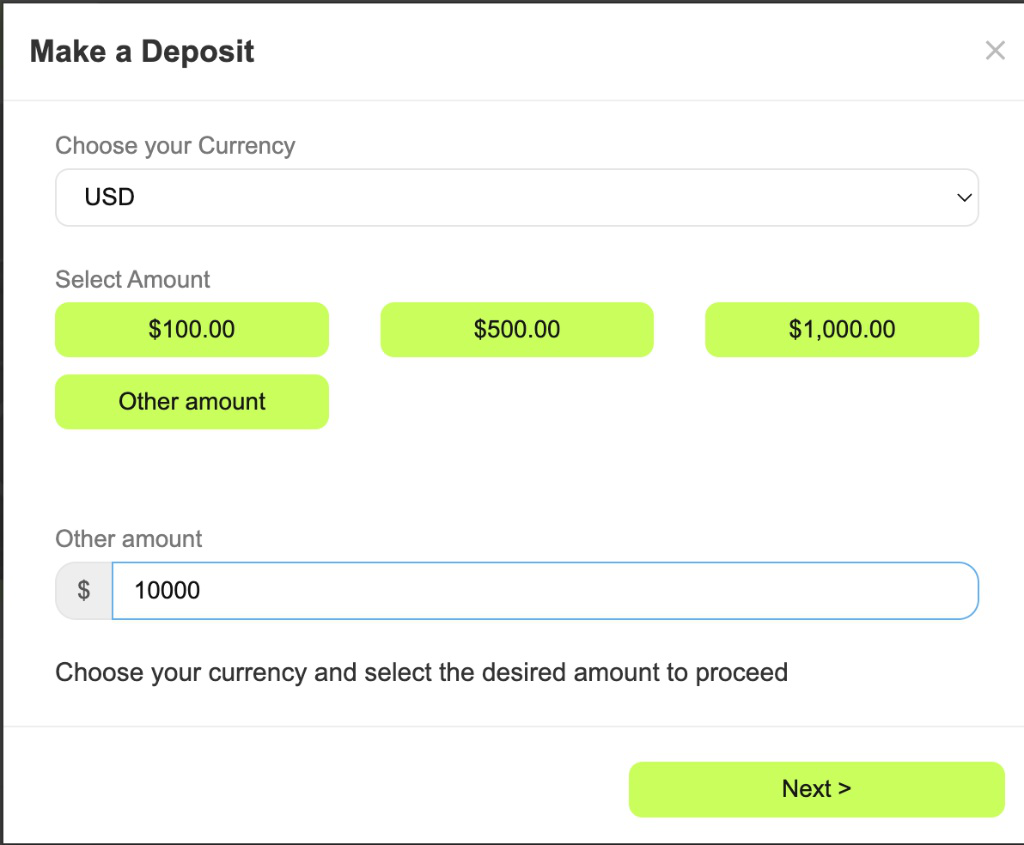
Fă depunerea
Start with a size that matches your goals — you can always top up later.
11

Choose a payment method

Select your funding option — Crypto (fastest), Visa/Mastercard, or bank wire — then click Submit to generate your deposit instructions.
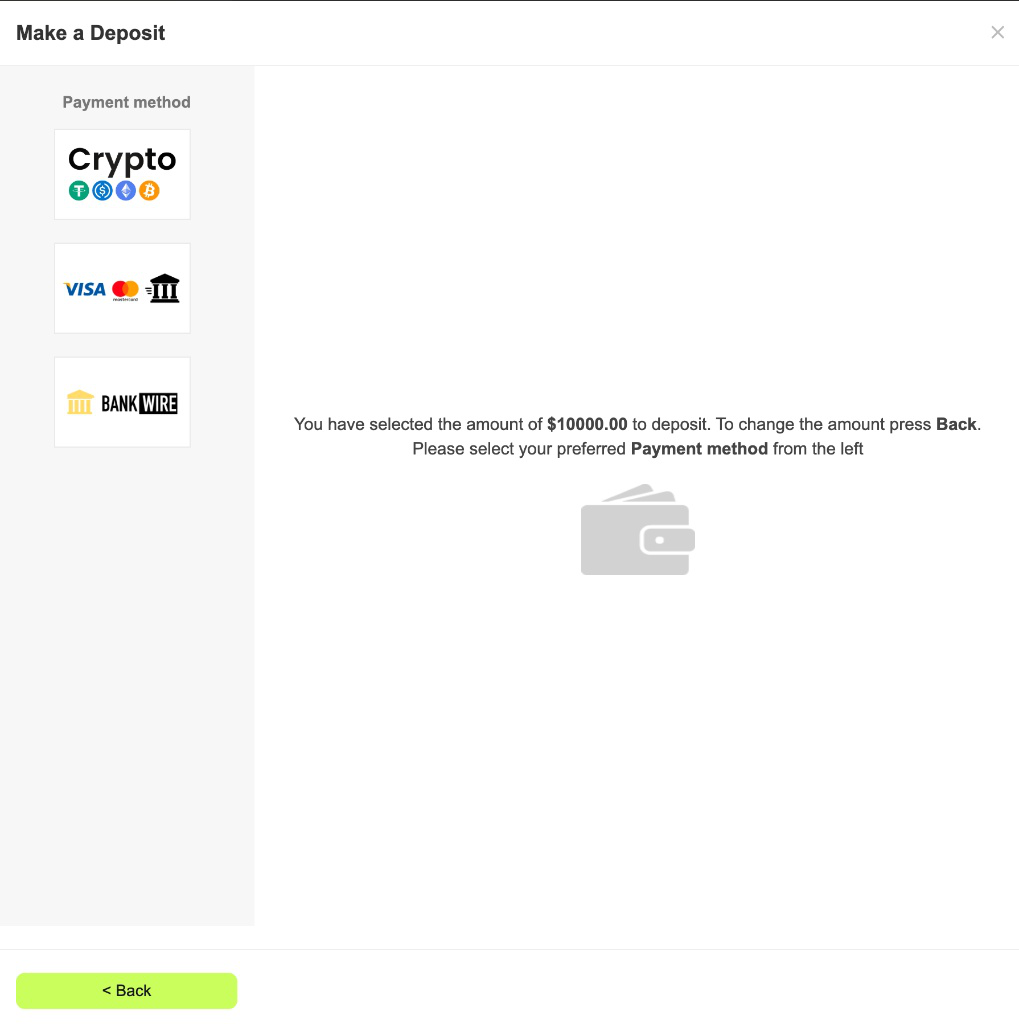
Alege metoda de plată
Which method to use — best to worst
  1. Crypto — recommended. Lowest fees, arrives in minutes, and it never fails.
  2. Bank transfer. Allow up to 6 days, though it is often quicker. Put your CU number in the transfer description — that is what matches the payment to your account.
  3. Card — not recommended. The highest fees and the most likely to be declined. In the EU especially, avoid it where you can.
12

Send your crypto

Pick your coin and, for USDT/USDC, the correct network. Copy the address (or scan the QR) and send the exact amount shown.
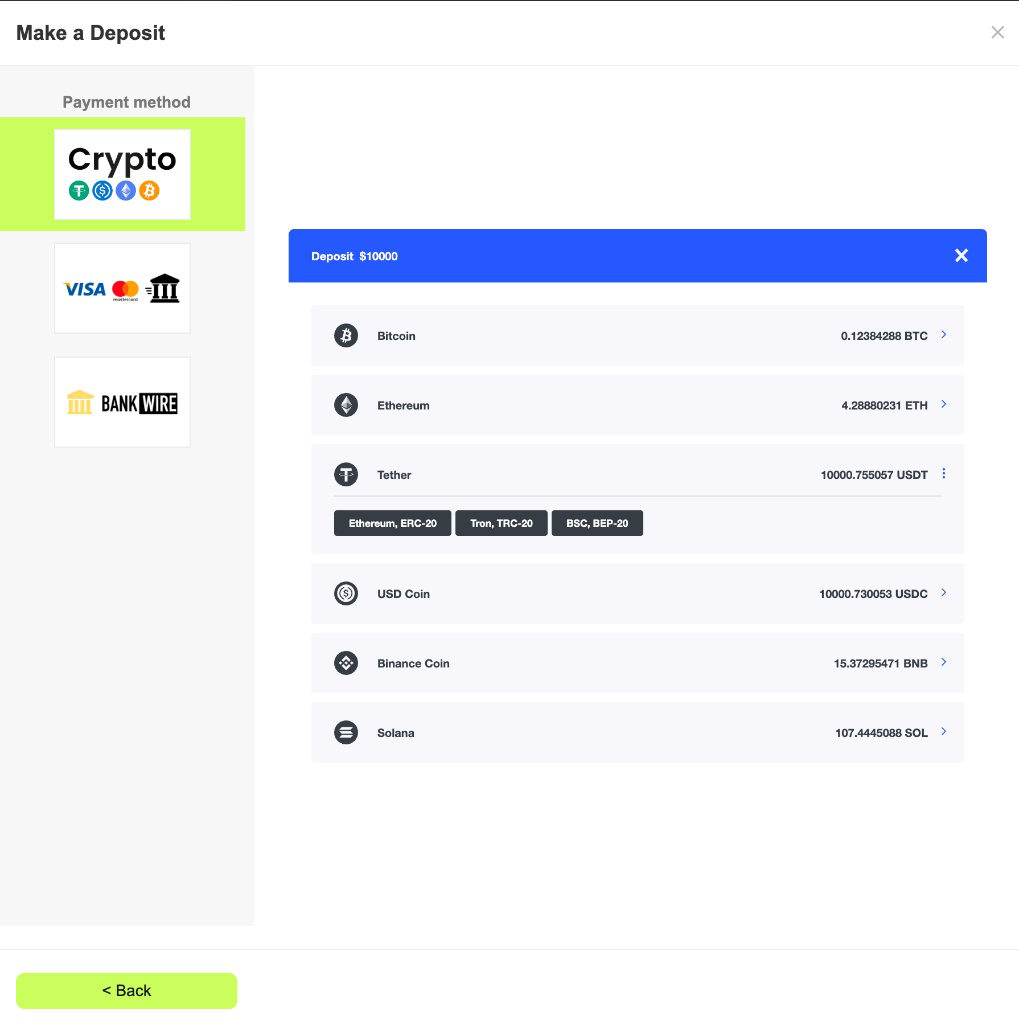
Trimite criptomonedele
Critical: the network you pick here must match the network you send from. A mismatch means funds are permanently lost and cannot be recovered.
4
Phase 4

Activate Sonic AI

Steps 13–14 · Connect to Sonic AI and start copy trading
13

Open CopyX & connect to Sonic

Click CopyX in the left sidebar to open the strategy browser. Open the SONIC card, click Details to review the stats, then click Connect to begin setup.
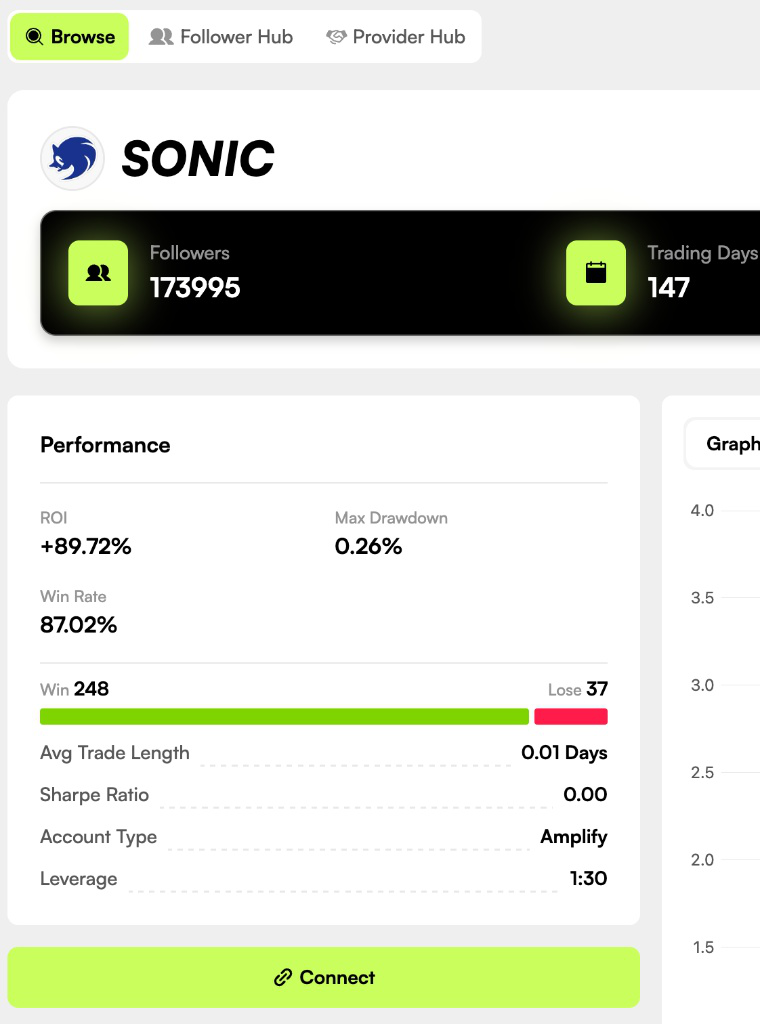
Conectează-te la Sonic în CopyX
Take a moment to review the live performance graph and trade history before connecting.
14
Don't forget · 24X Amplified

Set investment & activate 24X

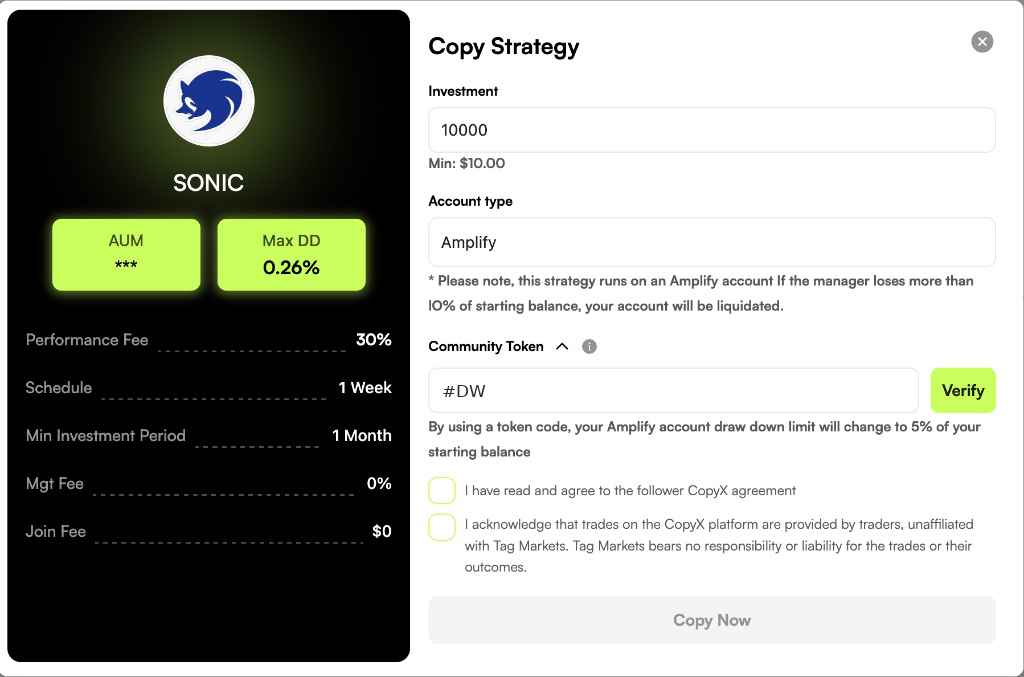
In the Copy Strategy popup, enter your investment in USD (minimum $10). Account Type is locked to Amplify. Then activate 24X in this exact order:

  1. Open the Community Token dropdown first, type #DW and click Verify.
  2. The Token Burn Wallet Address auto-fills. When the HASH/GU-ID field then appears, type 1000 and click Submit.
  3. Tick both acknowledgement boxes and click Copy Now.
1 · Type #DW in the Community Token field and click Verify. Scrie #DW în câmpul Community Token și apasă Verify 2 · The HASH/GU-ID field appears. Type 1000 and click Submit — then tick both boxes and click Copy Now. Scrie 1000 în câmpul HASH/GU-ID și apasă Submit
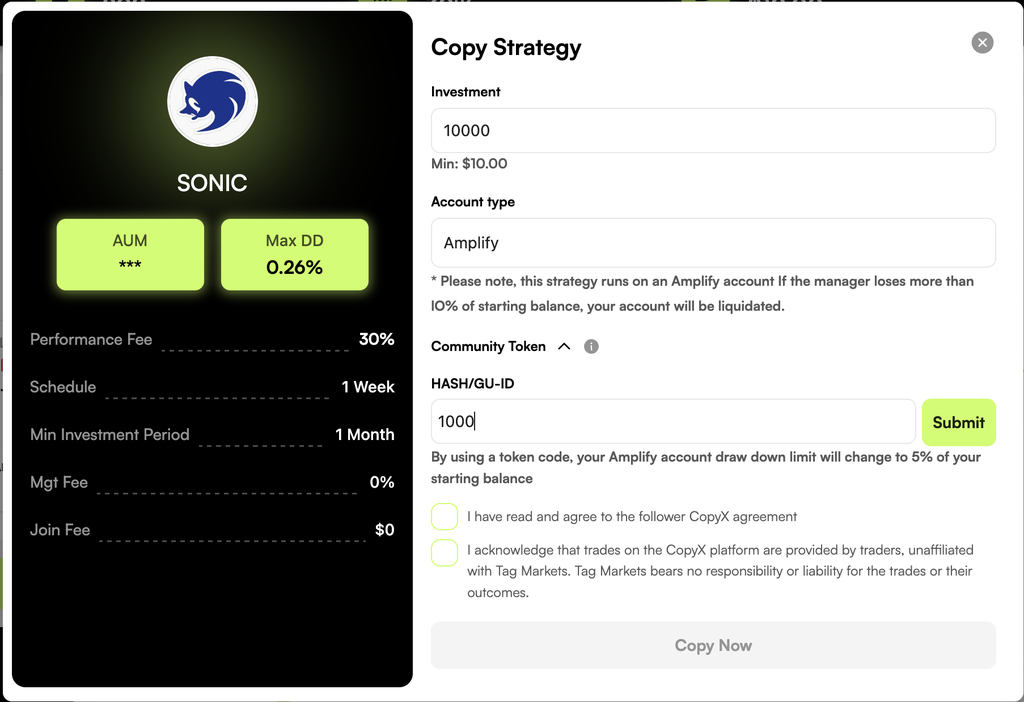
  • $10K → $240K trading capital (double the standard)
  • 5% drawdown limit
  • Free to activate — no payment, no personal code
Token: #DWHASH/GU-ID: 1000
Everyone uses the same free values — #DW and 1000. Prefer lower risk? Skip the Community Token field and click Copy Now for standard 12X amplification (10% drawdown limit).
★
Bonus material

Manage your live account

Track, monitor, and watch your trades anywhere
A

Tour your Follower Hub

After Copy Now, your home base is the Follower Hub in CopyX. The top bar shows Total Invested, Total PnL, and Total ROI, while the Dashboard tracks live performance day by day.
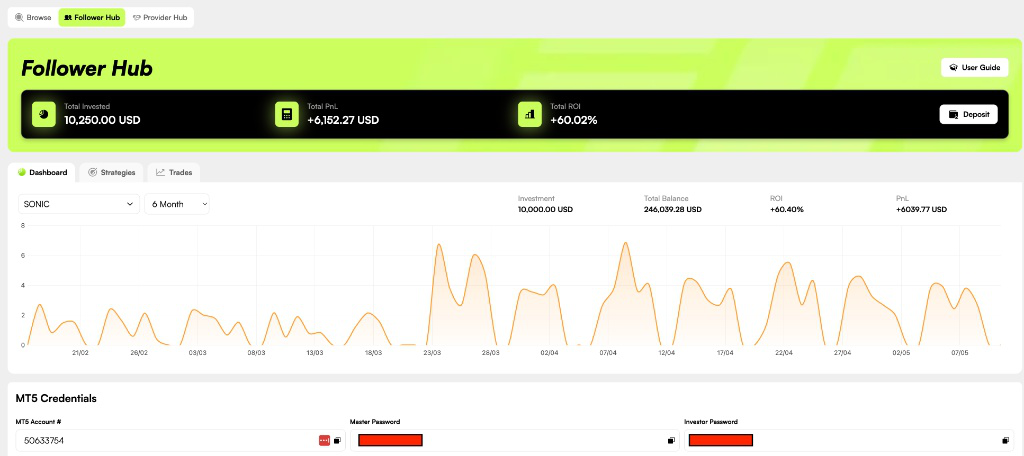
Panoul Follower Hub
Scroll to the bottom of the Dashboard for your MT5 credentials — account number, master password, and investor password.
B

Track trades & withdraw profits

The Trades tab lists every closed trade with entry, exit, and PnL. The Strategies tab is where you withdraw — pull profits or your initial deposit back to your TAG Wallet anytime.
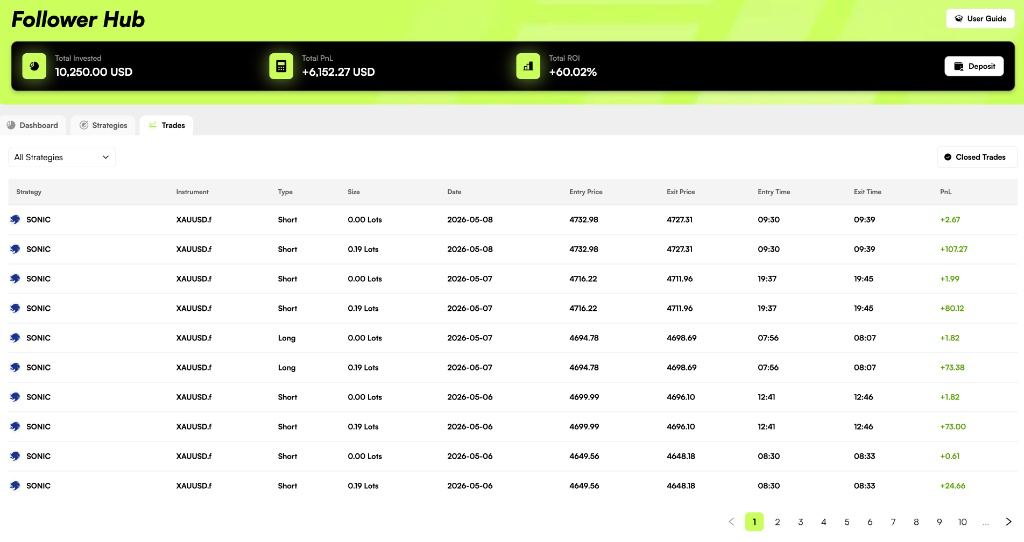
Tranzacții și retrageri
Profits are withdrawable from day one; initial capital becomes liquid after the 30-day lock-in period.
C

Install MT5 (optional)

Want to check trades from your phone? Install MetaTrader 5 by MetaQuotes, tap Settings → New Account, search for the listed broker, and begin sign-in.
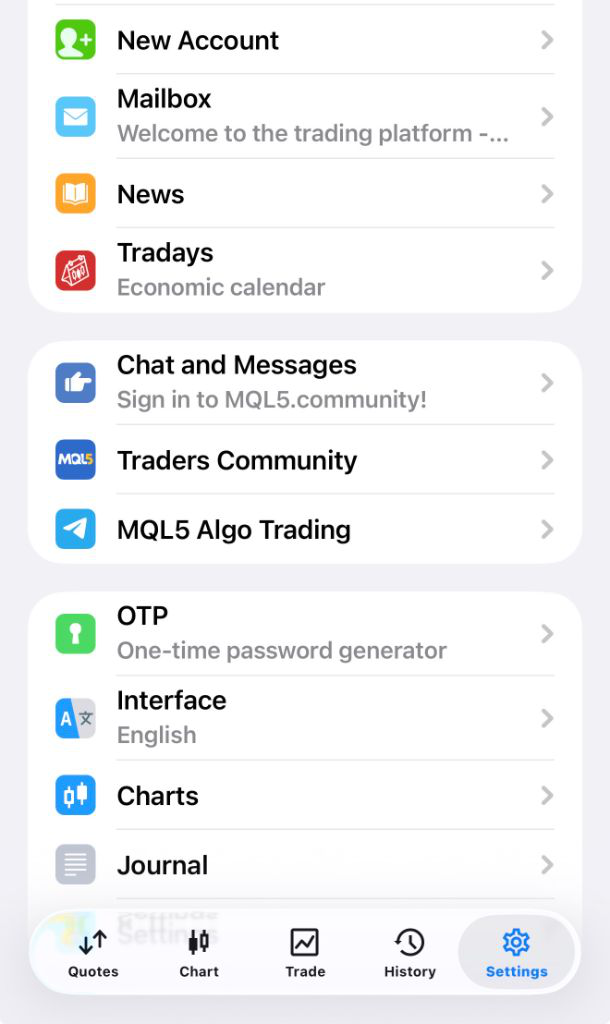
Instalează MT5
Entirely optional — everything works on the web Follower Hub without the app.
D

Sign in & see your account (optional)

On the sign-in screen the Server auto-fills. Enter your MT5 account number as the login and your Investor Password, then tap Sign In. The History tab shows your closed trades and current balance.
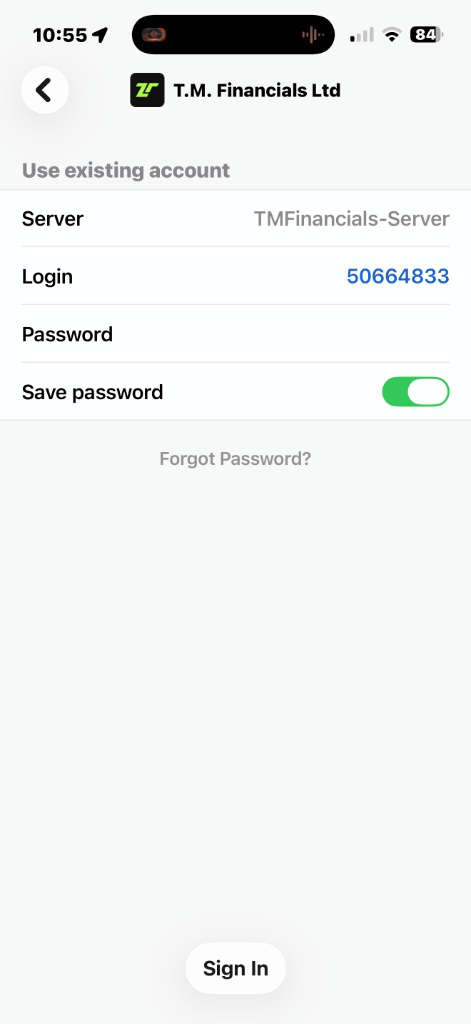
Conectează-te în MT5
Use the Investor Password — it has no trading rights, so your copy trading stays safe even if credentials are exposed.
No Charge

Switching on your 24X account

There's nothing to pay and no personal code to chase — the same values work for everyone. Just follow the two phases below.

Free activation

24X Account Setup

Roughly two minutes inside the COPYX "Copy Strategy" window.

Phase A — Register

Sign up using the invitation link you were given.

Phase B — Activate in the COPYX "Copy Strategy" popup
  1. Enter your investment amount and check that Account Type reads Amplify.
  2. Open the Community Token dropdown.
  3. Type #DW and hit Verify.
  4. Leave the Token Burn Wallet Address as it auto-fills.
  5. In the HASH/GU-ID field, enter 1000.
  6. Press Submit.
  7. Tick both agreement boxes and click Copy Now.
Done — your 24X account is now live.
You're live

Journey complete

Your Sonic AI account is active and trades are copying automatically — all in under 15 minutes.

RegisterSync TAG MarketsVerify & fundActivate Sonic AI
Începe înregistrarea →
100% off · limited time

Want this page as your own?

Team members get a replicated site with their own registration link — normally €99, free right now.

Create mine — free →
For members

How-to videos

Investors: follow steps 1 to 6 in order. Every video is under 90 seconds.

Investor · TAG Markets

From your first deposit to cash on your card.

1

Deposit

Fund your TAG Wallet.

  • Crypto (USDT on BSC) is the cheapest and fastest.
  • New: Apple Pay, under the card option.
Critical: the network you pick here must match the network you send from. A mismatch means funds are permanently lost and cannot be recovered.
2

Activate 24X

Connect your money to Sonic AI. It's free.

  • CopyX → SONIC → Connect, then enter your investment (min $10).
  • Community Token #DW → Verify, then HASH/GU-ID 1000 → Submit.
  • Tick both boxes and click Copy Now.
3

Watch your trades

Sonic AI trades for you. Nothing to do, just check in.

  • Follower Hub: total invested, profit and ROI at the top.
  • Trades tab: every closed trade with entry, exit and profit.
Follower HubTranzacții
4

Reinvest or withdraw

Decide what to do with your profit.

  • Reinvest adds it to your investment. Your trading-days timer resets to zero.
  • Withdraw moves it to your TAG Wallet.
Profits are withdrawable from day one; initial capital becomes liquid after the 30-day lock-in period.
5

Get your BIX card

Your crypto wallet with a Visa card. This is where your money lands.

  • Download BIX, sign up, verify your identity and create the card.
  • Then connect the card to CopyX: 3 clicks, shown in the BIX section below.
6

Cash out to BIX

Move your profit from TAG to your BIX card.

  1. BIX: Deposit → USDT → BNB Smart Chain. Copy your address.
  2. TAG: Tag Wallet → Your Crypto Wallets → Add. Currency USDT, network BSC.
  3. CopyX: Withdraw → Profits. The money moves to your TAG Wallet.
  4. TAG: Withdrawals → choose your crypto wallet → Submit.

That's the full cycle. Repeat steps 4 to 6 whenever you want your profit.

BIX card

Your crypto in a self-custody wallet, with a Visa card on top.

BIX in under a minute

Your crypto in a self-custody wallet, with a Visa card you can use anywhere Visa is accepted.

Get your BIX card

Sign-up, identity check, creating the card and topping it up, in 77 seconds.

Recommend BIX

Share your invitation link from the app. It takes 20 seconds.

Connect your BIX card to CopyX

Do this once, after your card is set up.
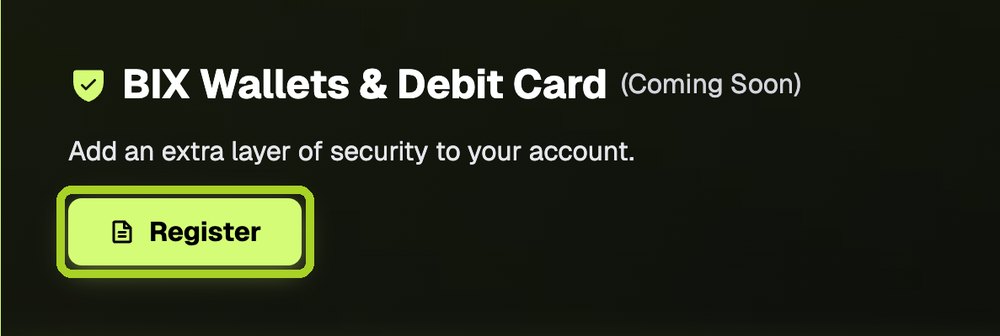
Profilul CopyX: butonul Register din caseta BIX

1Go to copyxapp.com/profile and click Register in the BIX box.
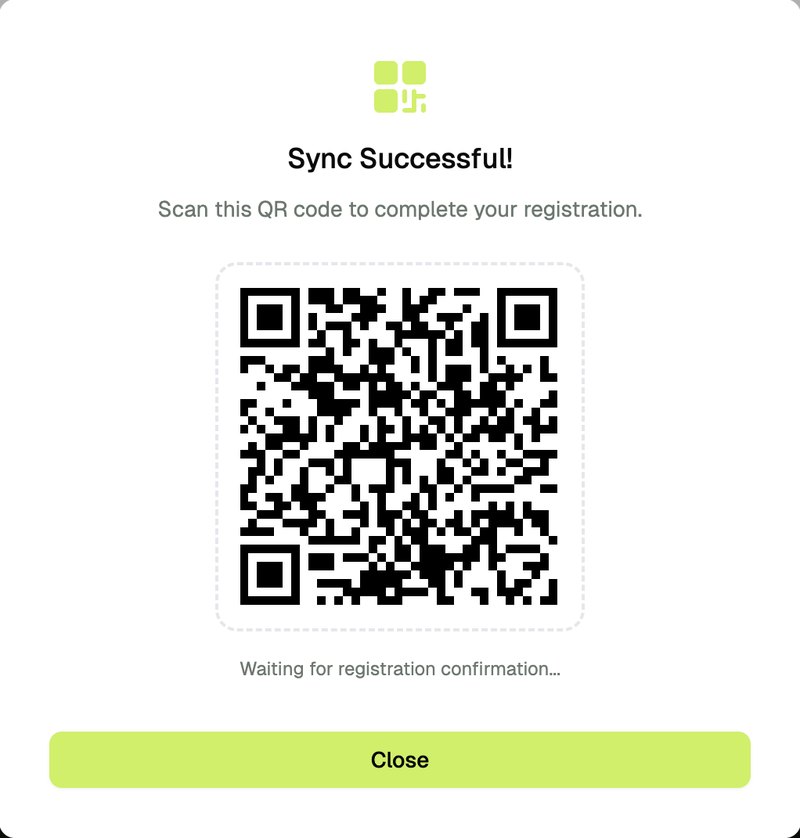
Codul QR afișat de CopyX

2A QR code appears on the screen.

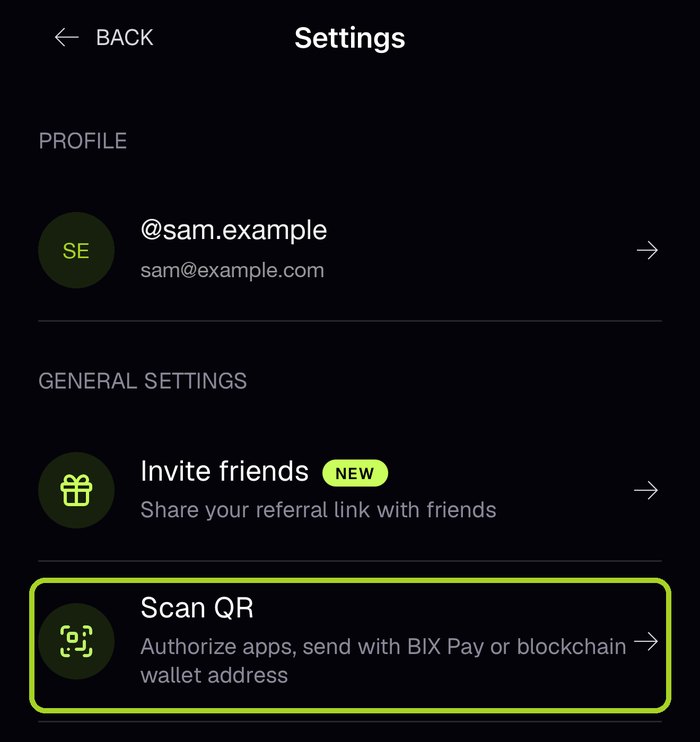
Aplicația BIX: Settings, Scan QR

3In the BIX app, go to Settings → Scan QR and scan the code.

🔒

Zona partenerilor

Enter the team password to open the partner area.

Wrong password. Try again.

Zona partenerilor

Everything for partners in one place. Pick a section.

4

Get your own site

A copy of this site with your own registration link.

→

Videoclipuri de prezentare

Alege videoclipul în funcție de persoana cu care vorbești. Trimite linkul sau urmăriți-l împreună într-un apel.

Pentru investitori3 min

1Introducere pentru investitori

Trei minute despre Sonic AI: rezultatele lună de lună pe MyFXBook, cum funcționează contul 24X, cât costă și cum sunt protejați banii clienților.

Trimite-l mai întâi oricui se gândește să investească: rezultatele, contul 24X, costurile și cum îi sunt protejați banii.

Pentru viitori parteneri10 min

2Programul de parteneriat

Programul de parteneriat AiTech pas cu pas: de unde vine comisionul tău, cele zece niveluri, ce le deblochează și cum începi.

Pentru cei care vor să câștige construind o echipă: cele cinci surse de venit, regula de 50% și cei trei pași pentru a începe.

Doar pentru parteneri, nu redistribui
Prezentare completă13 min

3Ambele împreună

Toată povestea într-un singur fișier: mai întâi introducerea pentru investitori, apoi programul de parteneriat, fără pauză.

Un singur videoclip pentru o întâlnire față în față sau un webinar: introducerea pentru investitori, apoi programul de parteneriat.

Doar pentru parteneri, nu redistribui
Calculator de proiecții

Cât ți-ar putea aduce, de fapt?

Preia cifrele auditate în timp real de pe MyFXBook, apoi modelează-ți propriul scenariu. Acestea sunt proiecții construite pe un istoric real — nu un randament fix și nu o promisiune.

Pasul 1 · Date în timp real

Importă un istoric real

Lipește orice sistem public MyFXBook, iar calculatorul îi citește statisticile auditate. Este precompletat cu Sonic AI — pune linkul unui concurent și compară singur.

Pasul 2 · Scenariul tău

Ce vrei să calculezi?

$
%
%
🔒

Doar pentru membrii echipei

Aceasta este prezentarea pe care partenerii o folosesc cu potențialii clienți. Introdu parola echipei ca s-o deschizi.
Parolă greșită — cere-o de la sponsorul tău.

🔒

BIX: acces pentru echipă

Prezentarea BIX este pentru membrii echipei. Introdu parola echipei ca s-o deschizi.

Parolă greșită. Încearcă din nou.